Colors
FluentWriter supports defining colors in multiple formats:
using Color = System.Drawing.Color;
using FluentWriter;
using FluentWriter.Common;

content
  .Paragraph(p => {
    p.Text("Red ").FontColor("#FF0000")
    p.Text("Green ").FontColor(0x00FF00);
    p.Text("Blue").FontColor(Color.Blue);
  })
  .Underline(UnderlineStyle.Wavy, ThemeColor.Accent3)
  .Bold();
Red Green Blue
Color Definitions
A color is typically defined using hex color notation. For example, the hex
color #FF0000 is used to color the following paragraph text as red:
content
  .Paragraph("NOTICE: Please respond immediately upon reading this letter.")
  .FontColor("#FF0000")
  .Bold();
Hex color notation is specified using the #RRGGBB syntax, where RR (red),
GG (green), and BB (blue)
hexadecimal integers specify the
components of the color in the in the sRGB
color space. All values range from 00 to FF (i.e., from 0 to 255) and are
case-insensitive. Hex colors can also be provided using the three-digit
notation: #RGB. The library automatically expands this notation to to the full
6-digit format. For example, the color #123 is expanded to #112233.
#FF0000, can also be expressed as 0xFF0000.Colors can also set using named colors in the
System.Drawing.Color
class:
content
  .Paragraph("NOTICE: Please respond immediately upon reading this letter.")
  .FontColor(System.Drawing.Color.Red)
  .Bold();
Theme Colors
The theme color class (ThemeColor) allows document authors to reference the
defined theme colors when styling elements. This makes
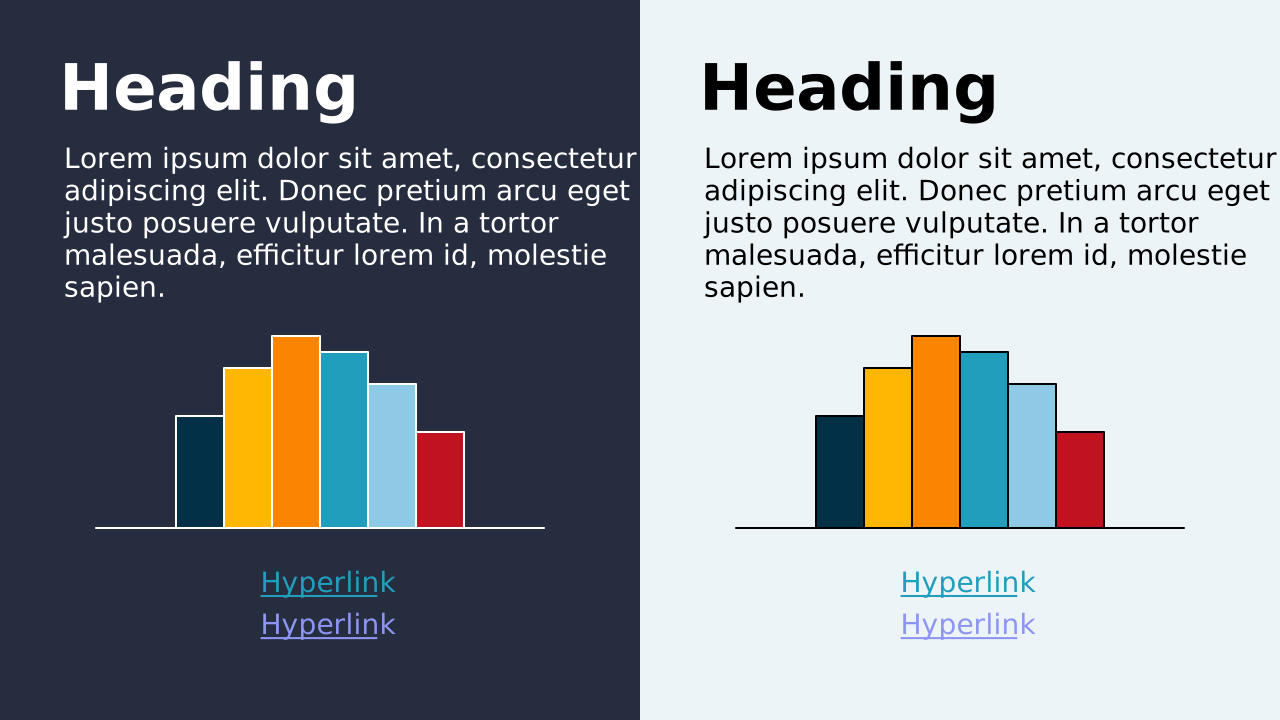
styling easier, consistent, and dynamic. The following figure illustrates the
default theme colors provided in FluentWriter while the
subsequent table summarizes the properties available in the ThemeColor class.
| Theme Color | Description |
|---|---|
Dark1 | The primary dark color. This color is often depicted as the foreground color for light backgrounds (specifically on ThemeColor.Light2). |
Light1 | The primary light color. This color is often depicted as the foreground color for dark backgrounds (specifically on ThemeColor.Dark2). |
Dark2 | The secondary dark color. This color is often depicted as the dark background color. |
Light2 | The secondary dark color. This color is often depicted as the light background color. |
Accent1 | The primary accent/brand color. |
Accent2 | The secondary accent/brand color. |
Accent3 | The tertiary accent/brand color. |
Accent4 | The fourth supporting accent color. |
Accent5 | The fifth supporting accent color. |
Accent6 | The sixth supporting accent color. |
Hyperlink | The color of hyperlinked text. |
FollowedHyperlink | The color of hyperlinked text that has been clicked/visited. |
Tints
Tints create lighter versions of a theme color by adding white. For example, a tint of 10% is 10% of the input color combined with 90% white.
content.Paragraph(p =>
{
  p.Text("████").FontColor(ThemeColor.Accent1);
  p.Text("████").FontColor(ThemeColor.Accent1.Tint90);
  p.Text("████").FontColor(ThemeColor.Accent1.Tint80);
  p.Text("████").FontColor(ThemeColor.Accent1.Tint70);
  p.Text("████").FontColor(ThemeColor.Accent1.Tint60);
  p.Text("████").FontColor(ThemeColor.Accent1.Tint50);
  p.Text("████").FontColor(ThemeColor.Accent1.Tint40);
  p.Text("████").FontColor(ThemeColor.Accent1.Tint30);
  p.Text("████").FontColor(ThemeColor.Accent1.Tint20);
  p.Text("████").FontColor(ThemeColor.Accent1.Tint10);
});
████ ████ ████ ████ ████ ████ ████ ████ ████ ████
ThemeColor instances contain properties for quickly specifying tints in 10%
increments. If necessary, a custom tint can be specified using the
Tint() method and passing the desired percentage of the input
color:
content.Paragraph("35% Tint").FontColor(ThemeColor.Accent1.Tint(0.35));
Shades
Shades are the opposite of tints, they create darker versions of a theme color by adding black. For example, a shade of 10% is 10% of the input color combined with 90% black.
content.Paragraph(p =>
{
  p.Text("████").FontColor(ThemeColor.Accent1);
  p.Text("████").FontColor(ThemeColor.Accent1.Shade90);
  p.Text("████").FontColor(ThemeColor.Accent1.Shade80);
  p.Text("████").FontColor(ThemeColor.Accent1.Shade70);
  p.Text("████").FontColor(ThemeColor.Accent1.Shade60);
  p.Text("████").FontColor(ThemeColor.Accent1.Shade50);
  p.Text("████").FontColor(ThemeColor.Accent1.Shade40);
  p.Text("████").FontColor(ThemeColor.Accent1.Shade30);
  p.Text("████").FontColor(ThemeColor.Accent1.Shade20);
  p.Text("████").FontColor(ThemeColor.Accent1.Shade10);
});
████ ████ ████ ████ ████ ████ ████ ████ ████ ████
Similar to tints, ThemeColor instances also contain properties for quickly
creating shades in 10% increments. A custom shade is specified using the
Shade() method and passing the desired percentage of the input
color:
content.Paragraph("35% Shade").FontColor(ThemeColor.Accent1.Shade(0.35));